
Troubleshooting
Causes and fixes for the most common onboarding, messaging, AI agent, billing, template and sign-in problems.
Find the symptom below and work through the checks in order. Most issues are resolved at the first or second check.
Onboarding
The Meta signup window does not open
- Allow pop-ups for Relay in your browser settings.
- Turn off ad or tracker blockers for Relay; they can block Meta's sign-in script.
- Try an up-to-date version of Chrome.
- Check that your Meta Business account is not restricted in Meta Business Suite.
My WhatsApp number is not listed during signup
- Sign in with the Facebook account that owns the Business account where the WhatsApp Business Account exists.
- You need Admin access to the Business account, not Employee access.
- If the number is with another provider, it must be released first. See Migrate from another provider.
Onboarding is stuck on Connecting
- Look for an unfinished Meta window behind the browser and complete it.
- Refresh the page and start again; repeating the flow is safe.
- If Meta asked for a verification code, check the phone for the SMS or call.
Messaging
Incoming messages are not arriving
Open Settings›Numbers and check the number's card.
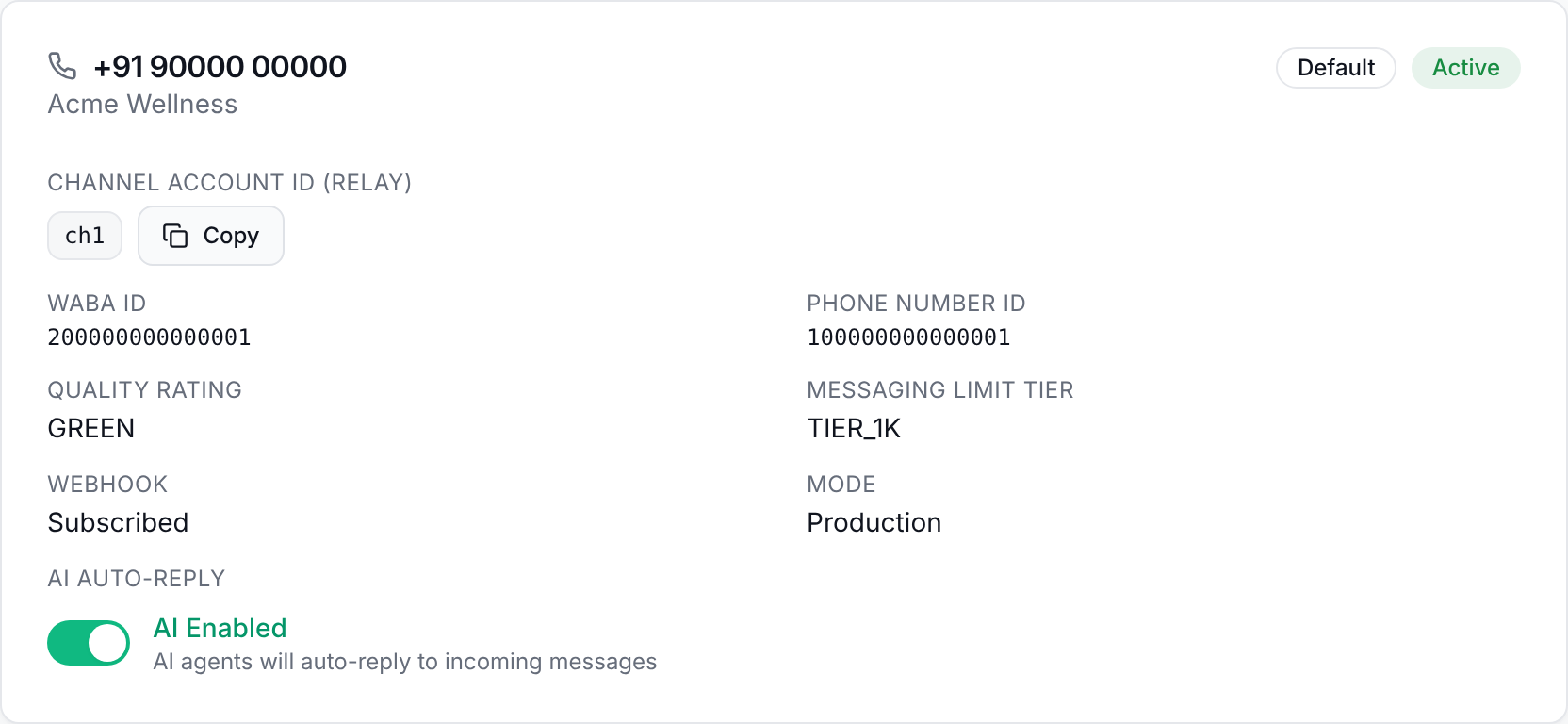
- Webhook should read Subscribed. If it does not, reconnect the number from the onboarding page.
- The number should be Active and in Production mode.
- Send a message from a phone that is not the connected number; messages you send to yourself are not delivered.
- If the number was connected with coexistence on, messages you send from the phone app do not appear in the inbox. Customer messages still do.
Outgoing messages fail with an error code
Failed messages show the WhatsApp error code. The most common ones:
| Error | Meaning and fix |
|---|---|
| 131047 | More than 24 hours have passed since the customer last messaged you. Send an approved template instead of a free-form message. |
| 131026 | The message could not be delivered, for example because the recipient isn't on WhatsApp or the template isn't approved. Check the number and the template's status under Templates. |
| 133005 | Two-step verification PIN mismatch. In Meta's WhatsApp Manager, open Phone numbers and turn off or reset two-step verification, then reconnect. |
| 80007 | Rate limit reached. Wait a few minutes and retry; slow down campaign sending if it recurs. |
The AI agent is not replying
- Check AI auto-reply is on for the number under Settings›Numbers.
- Open the conversation in the Inbox. If it shows AI paused, a teammate or the agent handed it to a person; select Resume to hand it back.
- Check that at least one agent exists and is enabled on the Agents page.
- Check your plan's monthly message allowance on Billing. The Free plan includes 100 messages per month.
Billing
I paid but my plan has not changed
- After payment, Relay checks with the payment provider automatically for about 30 seconds. Stay on the Billing page until it finishes.
- Wait a minute, then reload the Billing page.
- If the plan still has not changed, email support@branemind.com with your workspace name and payment reference.
“Payment required” when creating an agent or campaign
You have reached a limit on your current plan.
| Plan | Limits |
|---|---|
| Free | 1 agent, 100 messages per month, no knowledge base. |
| Starter | 3 agents, 5,000 messages per month, 1 knowledge document. |
| Growth | 10 agents, 20,000 messages per month, unlimited knowledge documents. |
If you upgraded moments ago, wait 10 to 15 seconds for the subscription to activate.
Templates
Meta rejected my template
- Keep Utility templates free of promotional wording; use the Marketing category for offers.
- Use numbered placeholders such as
{{1}}and{{2}}, and provide a sample value for each. - Avoid starting or ending the body with a placeholder.
- Review Meta's template guidelines, edit the template, and resubmit.
Account and sign-in
I can't sign in
- Use Forgot password on the sign-in page.
- If you signed up with Google, use Continue with Google.
- Clear cookies and site data for Relay, then try again.
I am signed out often
Sessions renew automatically while you use Relay. If you are signed out repeatedly, make sure your browser allows cookies and site storage for Relay, and that a privacy extension isn't clearing them.
Contact support
Email support@branemind.com with your workspace name, the phone number involved, what you expected to happen, and a screenshot of any error.